
3D Printed Enclosures for Electronics in Bangladesh: Eight Projects and the Design Rules
Eight electronics enclosures PrototypeBD designed or printed, from an IoT gas meter to an MPPT charge controller, and the wall, boss, vent and material rules they show.
A circuit that works on the bench still needs a box before anyone else can use it. Off-the-shelf project boxes rarely line up with your connectors, display and mounting holes, and an injection mould only pays off at volume. That is where a 3D printed enclosure fits. Between 2023 and 2026 PrototypeBD posted eight enclosure and housing jobs on its Facebook Page, from a mini-PC casing designed in Fusion 360 to an MPPT solar charge controller box. This case study looks at what those parts show, then turns them into practical design rules for anyone in Bangladesh planning a custom enclosure: wall thickness, screw bosses and heat-set inserts, clearances, ventilation, and when to pick PETG or ASA over PLA.
Eight enclosure and housing projects
A 3D printed enclosure is a custom FDM-printed box shaped around your board, ports and mounting points. Start with 2 mm walls, 0.5 mm clearance around parts, bosses or brass inserts for screws, and PETG or ASA for heat or sun. STL, 3MF and OBJ files get an automatic price on the FDM quote page, STEP/STP files are priced by hand, and if you only have a sketch you can order CAD design first.
The table lists what each post states and what the photos or videos show. Where a post names the designer or developer, the table credits them as the post does. Where a post does not say who designed the part, or which material was used, the table does not say it either.
| Project (post date) | What the post says | Design details visible in the photos |
|---|---|---|
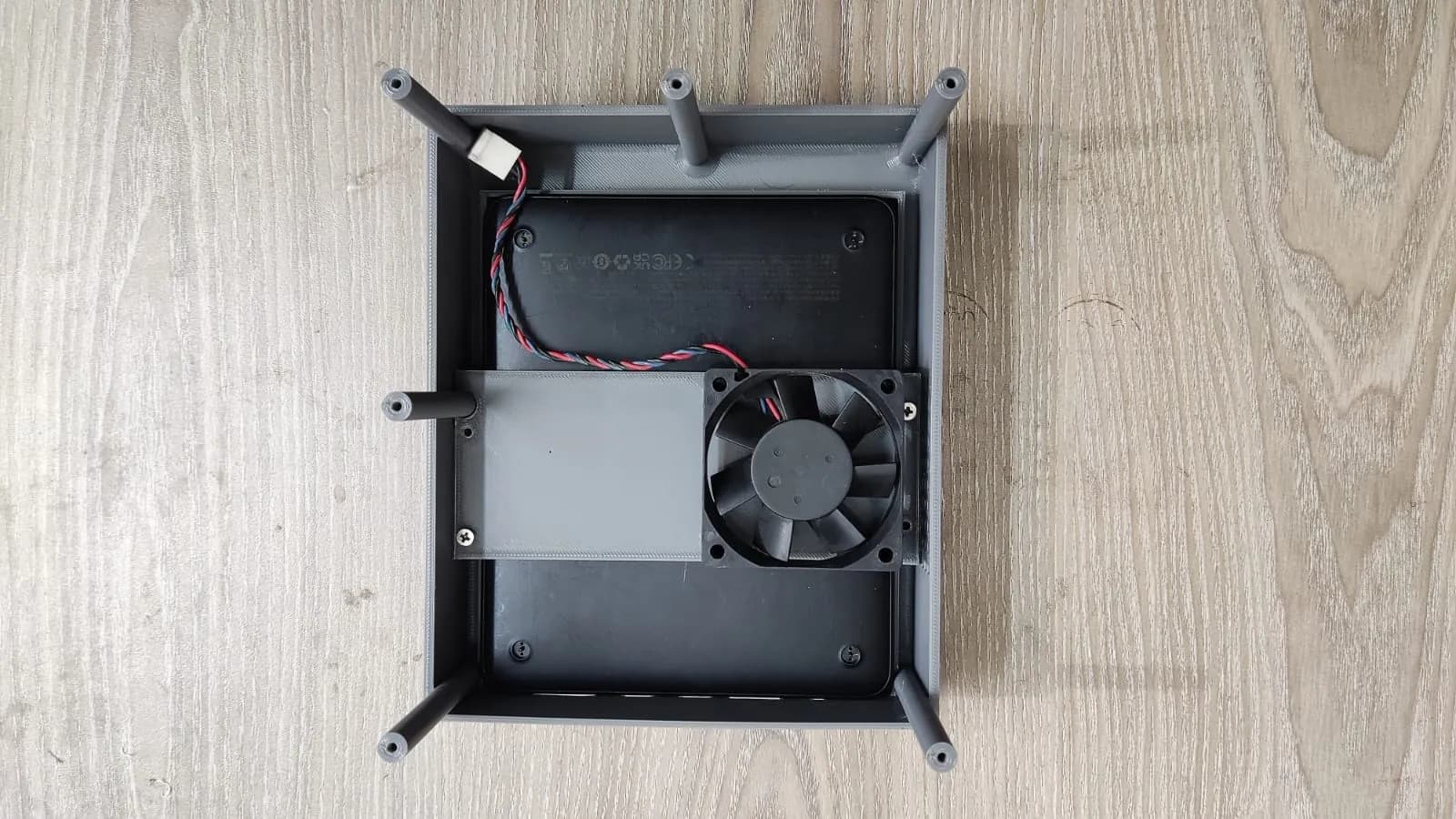
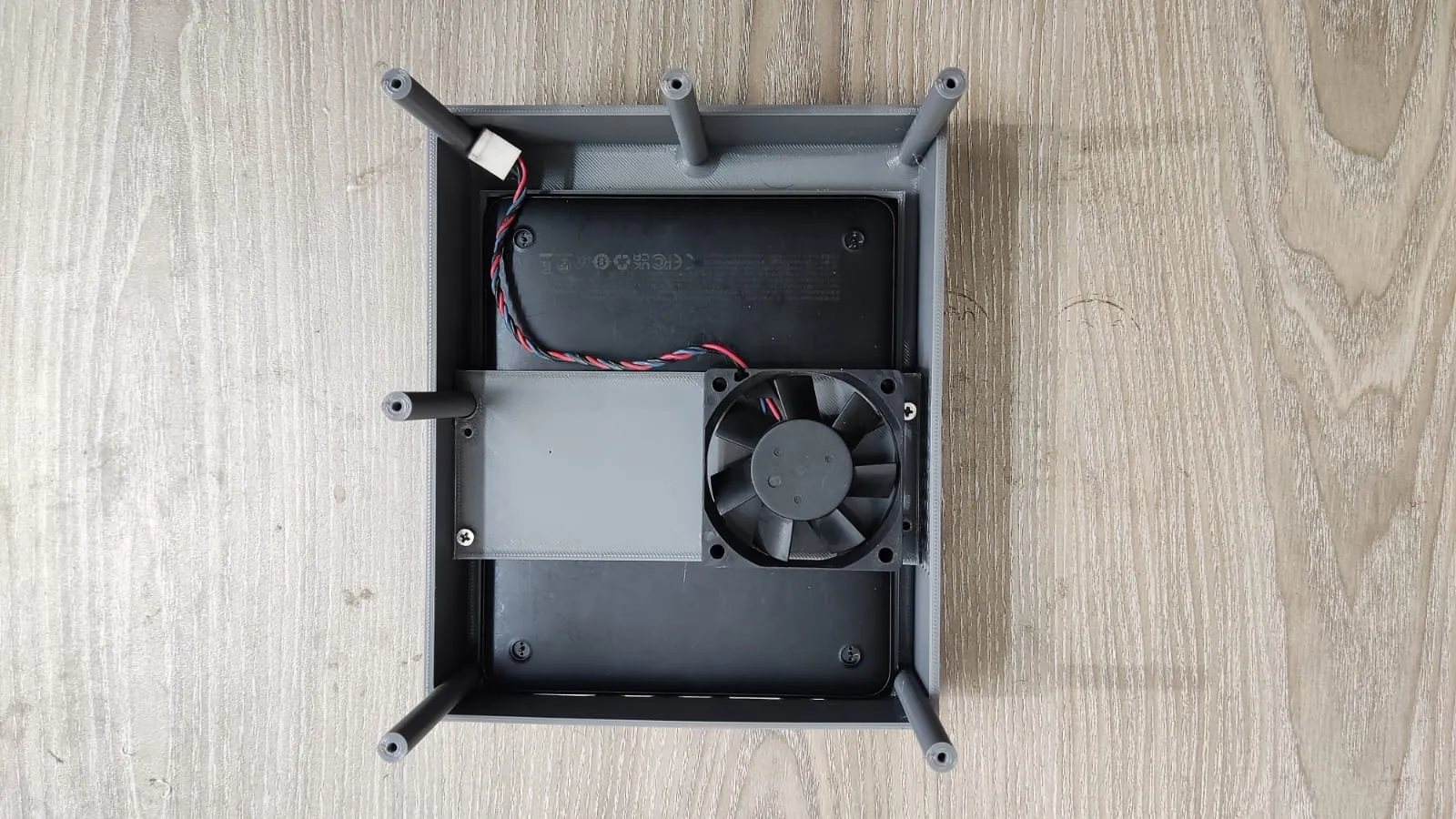
| Casing for a mini PC, power bank and USB modems (Nov 2023) | Designed and manufactured by PrototypeBD in Fusion 360, printed by FDM | Base tray, fan bracket, slotted rails holding three USB modems, a lid with a grid of vent holes, side cut-outs for USB ports, a round opening and a card slot |
| Production parts for industrial electronics in garment factories (Sep 2024) | Printed for a Sri Lankan client as a production batch | Dozens of identical grey parts, each a round base with an upright tube, laid out in rows |
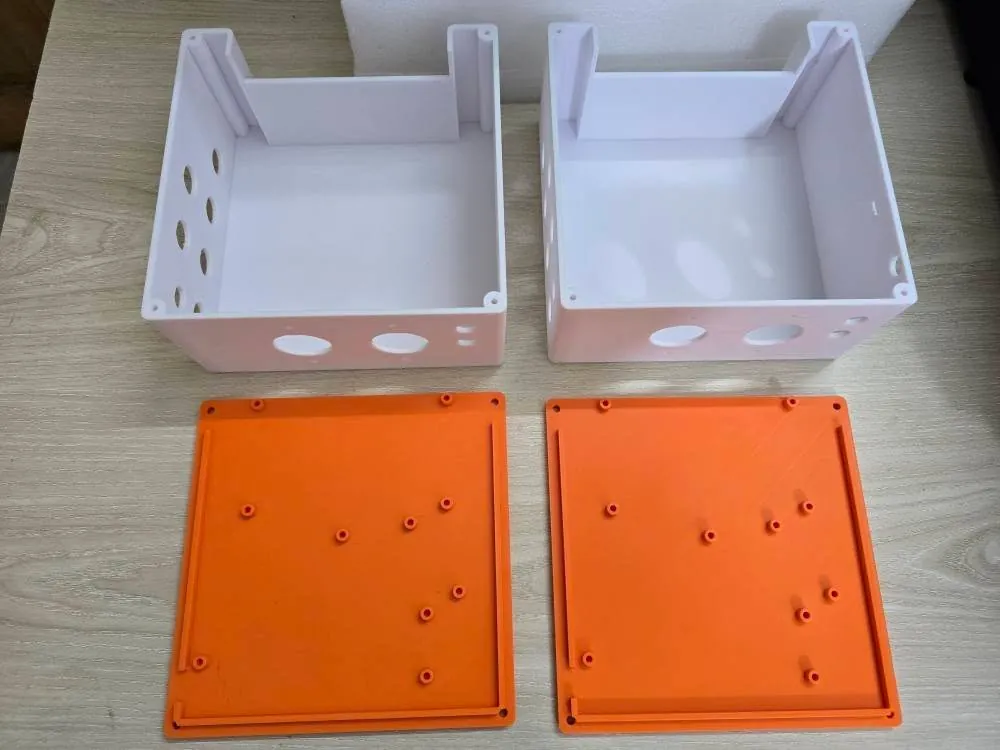
| Enclosure for an aquaponics system (Aug 2025) | Custom fit, described as weather-resistant and built for agricultural use | White boxes with orange lids, round cable-entry holes, screw holes at the lid corners, scattered standoffs on the underside of the lid and slot guides inside the box |
| Outdoor emergency siren housing (Feb 2026) | Design: MD Moin Uddin Dihan; 3D printing: PrototypeBD | A grey round housing around a bladed rotor, with screw holes around the rim |
| ITX mini-PC side panel (Mar 2026) | Designed and printed by PrototypeBD; matte black, airflow mesh | A frame panel with corner screw holes; slanted mesh openings on the fitted case |
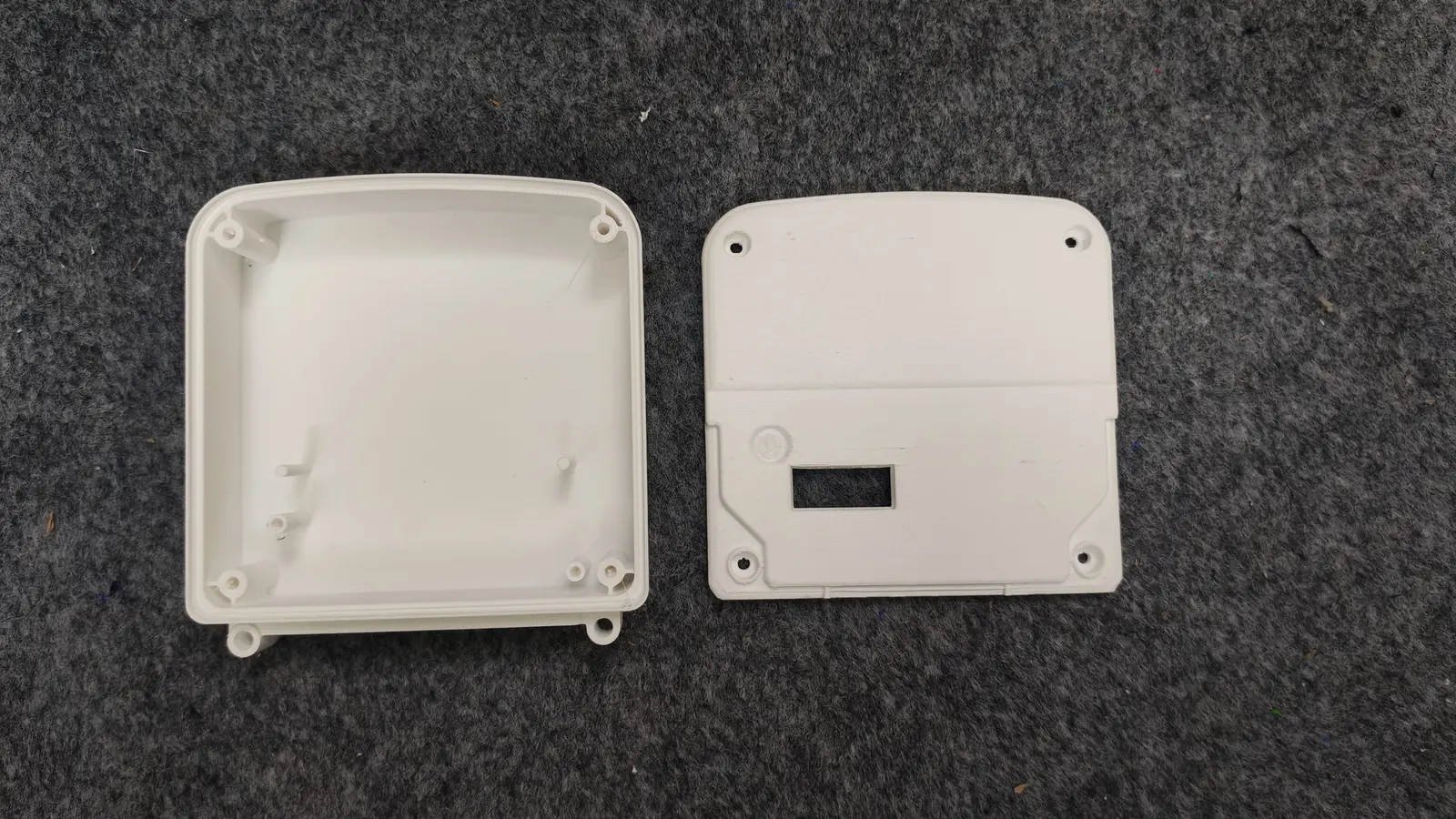
| IoT gas meter enclosure (Jun 2026) | Enclosure designed and manufactured by PrototypeBD, from 3D CAD to the printed part; product developed by MD Rakibul Hasan | A white two-part housing: the cover screws into bosses inside the corners, two mounting ears sit on the bottom edge, and the cover has a display window; printed as a batch of several units |
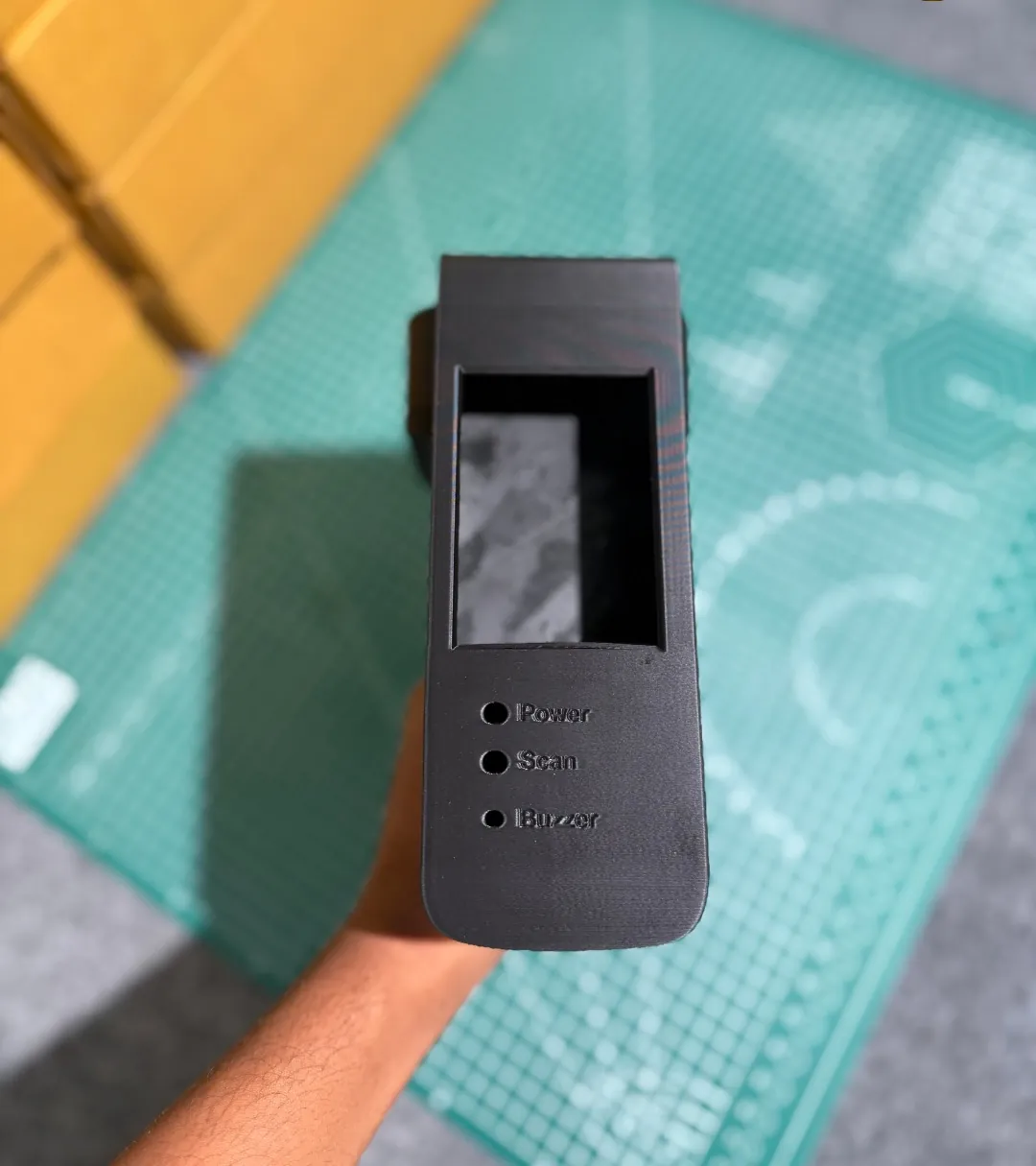
| Handheld ID card verification device (Jul 2026) | A fully customised enclosure for comfortable handheld use | Pistol grip, a display window, labelled holes for Power, Scan and Buzzer, and a textured reader face with text printed into it |
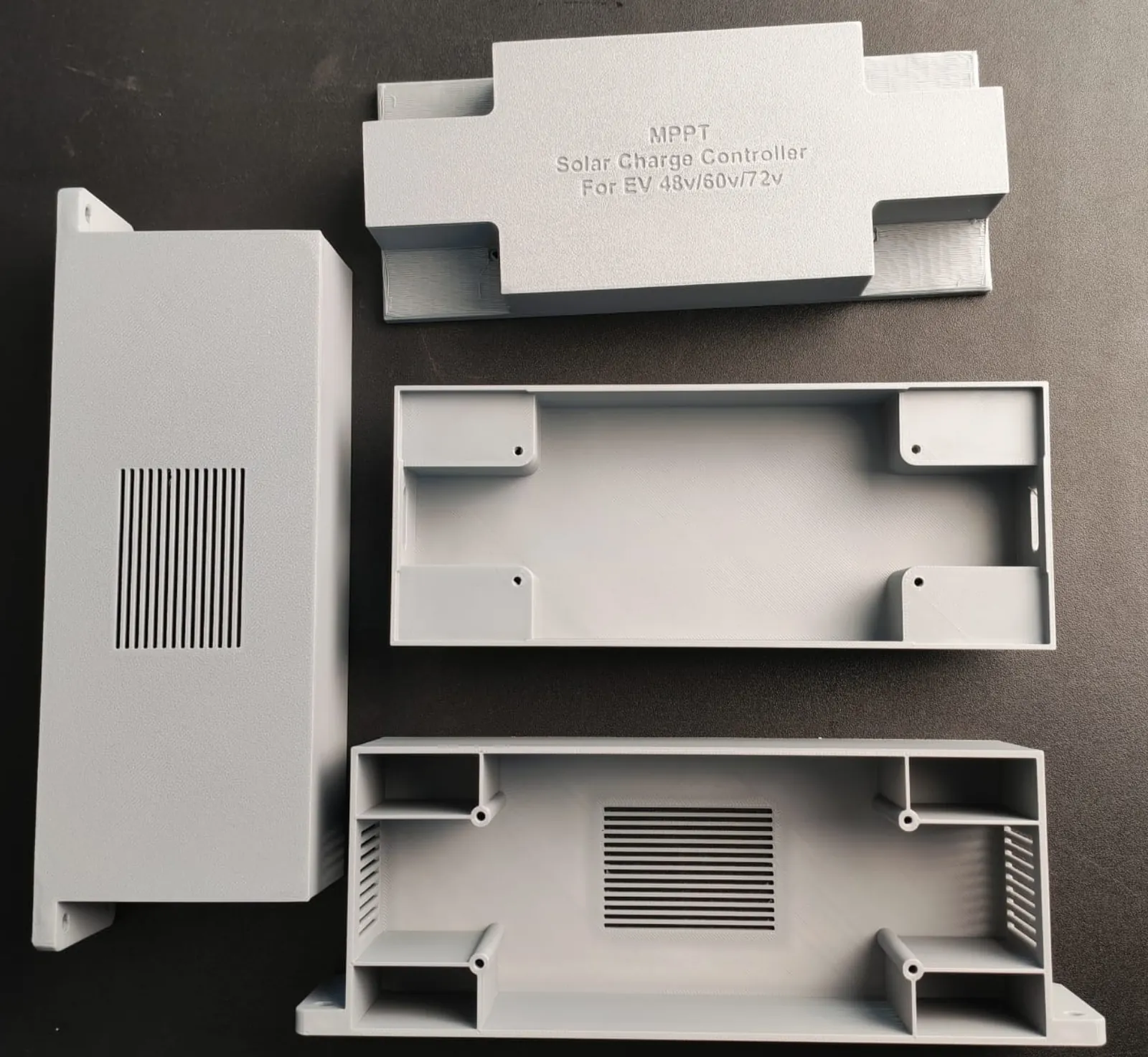
| MPPT solar charge controller enclosure (Oct 2026) | Made to the project's needs, with a precise fit, clean finish and ventilation | Slotted vent grilles in the base and side walls, corner screw bosses tied to the walls by ribs, mounting flanges and lettering printed into the lid |
Read together, the posts show a pattern. Even the simplest box here has holes, guides or windows placed for one specific board, display or connector. That is the main argument for printing an enclosure instead of buying a standard one, and it is also why the design rules below matter more than the printer.
Wall thickness: start at 2 mm
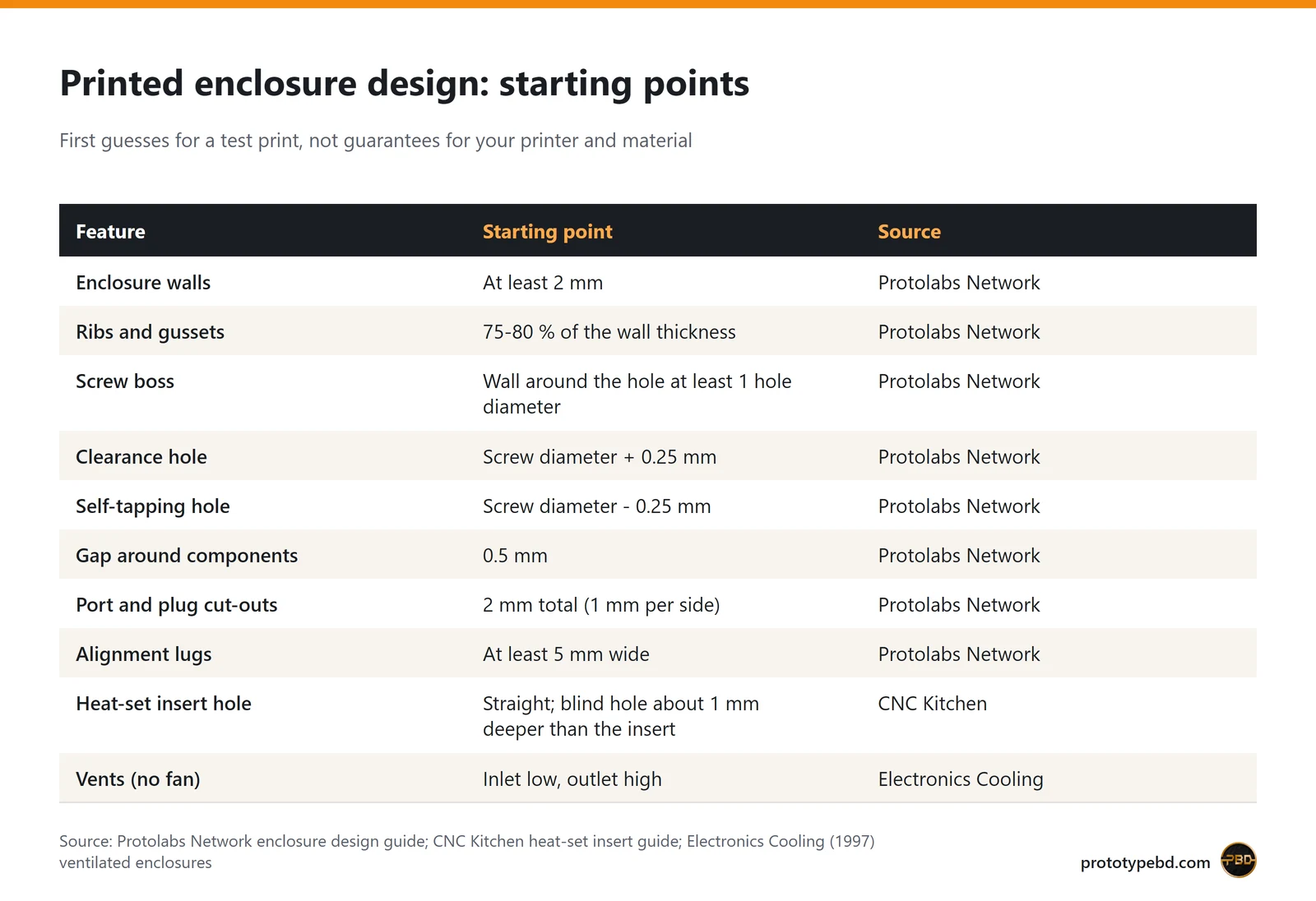
Protolabs Network's enclosure guide recommends a minimum wall thickness of 2 mm for all enclosure walls. Thinner walls print, but a box also has to take screws, survive a drop and stay flat. Long, flat sides are the first to flex, so they need more thickness or a few ribs. The same guide sizes ribs and gussets at 75 to 80 % of the wall they support.
The MPPT enclosure shows the idea well. Its four screw bosses sit in the corners and are joined to the side walls by short ribs, so the corner carries the screw load instead of a free-standing post.
Screw bosses and heat-set inserts
Screws need something solid to bite into. Protolabs Network suggests leaving at least one hole diameter of wall around a screw hole, so an M3 screw wants a boss at least 9 mm across. It also gives two starting points for hole sizes: add 0.25 mm to the screw diameter for a clearance hole, and take 0.25 mm off for a hole a self-tapping screw should cut its own thread in.
Screws driven straight into plastic wear the thread each time the box is opened. If the enclosure will be opened for service or programming, use brass heat-set inserts. CNC Kitchen's guide explains that bare plastic threads strip after repeated assembly while inserts stay intact. Its practical points:
- Use a straight hole, not a tapered one, and make a blind hole about 1 mm deeper than the insert, so melted plastic has somewhere to go.
- Printed holes usually come out smaller than in the CAD model, so print a small test piece with your material before the full enclosure.
- Set the soldering iron roughly 10 to 20 °C above the printing temperature, press the insert about 90 % of the way with the tip and finish it with a flat tool.
This also explains a sentence on PrototypeBD's FDM page: holes print slightly undersize and are best drilled or reamed to the final fit. Protolabs Network gives the same advice for critical holes in its FDM design guide: print them undersized, then drill.
Clearances, ports and lids
A printed box is never exactly the CAD size, and neither are the parts you put inside it. PrototypeBD's FDM page states that standard parts hold about ±0.2 mm on most dimensions. Protolabs Network recommends leaving 0.5 mm around all internal components and 2 mm in total (1 mm per side) around ports and plugs. A USB cut-out drawn exactly to the connector size usually means a plug that will not go in.
The 2023 device casing shows how ports and internal parts can be planned together. The side wall carries cut-outs for two USB-A ports, two USB-C ports, a round opening and a card slot. Inside, printed rails hold three USB modems upright, and a separate bracket carries the fan, so nothing rattles loose when the box is moved.
The lids show two useful ideas. On the gas meter housing, the cover screws go into bosses inside the corners, so the outside stays clean, and two ears on the bottom edge let the housing be screwed to a surface. On the aquaponics boxes, the underside of each lid carries scattered standoffs, the kind used to hold a circuit board, so the lid doubles as a mounting plate for the electronics. If you add alignment lugs to locate a lid, Protolabs Network recommends making them at least 5 mm wide.
Parts that press or snap together need a much smaller gap than the 0.5 mm around loose components. For press-fit and snap-fit joints, such as a lid that clicks onto its box, PrototypeBD generally works with about 0.1 mm, and with 0.1 to 0.3 mm depending on the material and the printer's precision. Print one joint as a test piece before the full batch if the fit matters.
Ventilation without losing protection
Electronics that dissipate power, such as a charge controller or a mini PC, need a path for the heat. In a ventilated case without a fan, air works like a chimney: an Electronics Cooling article describes how cooling air enters through the lower vent and leaves through the upper vent, and the height between the vents and their area decide how much air moves. In practice: put inlet slots low, outlet slots high, and do not block them with the board.
The MPPT enclosure has slotted grilles in the base and in the side walls, and the 2023 casing combines a small fan with a lid full of vent holes. Both show that vents are cheap to print: they are simply part of the model.
The trade-off is protection from dust and water. The IP code from IEC 60529 rates both with two digits: IP54 means dust-protected and safe against splashing, IP65 dust-tight and safe against water jets. Every open vent moves a box away from those numbers. An outdoor or wet-area enclosure, like the aquaponics boxes, usually needs a different approach: fewer and covered openings, cable glands in the entry holes and a gasket under the lid. If your product must meet a specific IP rating, design for it from the start and test the finished box. Printing alone does not give a box an IP rating.
PLA, PETG or ASA: choose by heat and sunlight
The material choice for an enclosure comes down to where it will live and how warm the inside gets. The figures below come from the Prusa material guides, and other brands' grades will differ a little.
| Material | Heat limit (Prusa guide) | Sunlight and outdoors | Good enclosure use |
|---|---|---|---|
| PLA | Softens and deforms over 60 °C | Degrades under UV; not for outdoor use | Fit-check prototypes and indoor boxes with little heat inside |
| PETG | Interior and most exterior use below 80 °C | Resists water and humidity well | Functional indoor enclosures, boxes near moisture, many sheltered outdoor uses |
| ASA | Temperature resistance up to 93 °C | High UV resistance, suitable for outdoor use | Enclosures in direct sun, outdoor housings, warm power electronics |
Two practical notes for Bangladesh. First, the limit applies to the inside of the box, not the room: a sealed enclosure with a power board inside, or a box left in direct sun, gets much warmer than the air around it. A box that lives on a rooftop or in a vehicle should be PETG at least, and ASA if it sees the sun all day. Second, ASA is harder to print. Prusa's guide notes significant warping without an enclosure and fumes that need a ventilated room, which is one reason to order ASA parts rather than start with them at home.
All three materials are in PrototypeBD's FDM printing service, along with ABS, TPU, nylon and PLA-CF. If you print your own boxes, the same spools are in the shop, for example Bambu Lab PETG HF and Bambu Lab ASA; the filament guide for Bangladesh compares the wider range. If the device runs from mains power or carries high battery currents, also check which flammability rating your product's safety standard asks for before you choose a filament.
Branding and labels printed in
Two of the projects carry their text in the print itself. The MPPT lid carries the product name and the 48 V, 60 V and 72 V EV systems it is for, and the ID card verifier has its name on the reader face and labelled holes for its three indicators. Raised or recessed text costs nothing extra in printing and never peels off like a sticker. Keep it simple, with bold letters and a modest size, because FDM softens small text and fine features, as PrototypeBD's FDM page notes.
From sketch to printed enclosure
Most enclosure jobs start in one of two places. If you already have a 3D model, upload it to the FDM quote page: STL, 3MF and OBJ files get an automatic sliced price, and STEP/STP files are accepted and priced by hand. Parts up to 400 × 400 × 400 mm print in one piece, and the page states that most jobs finish within 2 to 5 working days of confirmation. Parts are delivered with supports removed and surfaces cleaned, without sanding or painting as standard.
A few facts from PrototypeBD itself about how this work is done. Most enclosures are printed on high-end Bambu Lab printers such as the P1S, P2S and X2D; parts too large for those go on a Creality Ender-5 Max, which Creality lists with a 400 × 400 × 400 mm build volume. The posts don't say which printer made which enclosure. Assembly, painting and LED lighting can be added on request, and PrototypeBD tries its best to match what you need; ask for them when you send the file, because they are not part of a standard print.
If you only have the board, a sketch or measurements, the CAD design service turns them into a manufacturable model (STEP or STL) first, as in the gas meter and mini-PC projects above. To make that design fast and accurate, send:
- The board outline and mounting-hole positions, ideally as a DXF or STEP from your PCB tool, or a clear photo next to a ruler.
- Every connector, button, LED and display, with the side of the box it must reach.
- What gets hot (regulators, MOSFETs, a processor) and whether a fan is allowed.
- Where the device will live: on a desk, in a factory, outdoors or in a vehicle.
- How it is mounted (wall flanges, DIN rail, handheld) and how often it will be opened.
- The quantity, since a batch of identical boxes, as in the gas meter and factory projects, changes how the parts are laid out for printing.
Print one enclosure first, fit the real electronics, then adjust the holes and clearances before ordering the batch. For more examples of PrototypeBD's prototype work beyond enclosures, see the product prototyping case study.
Related articles
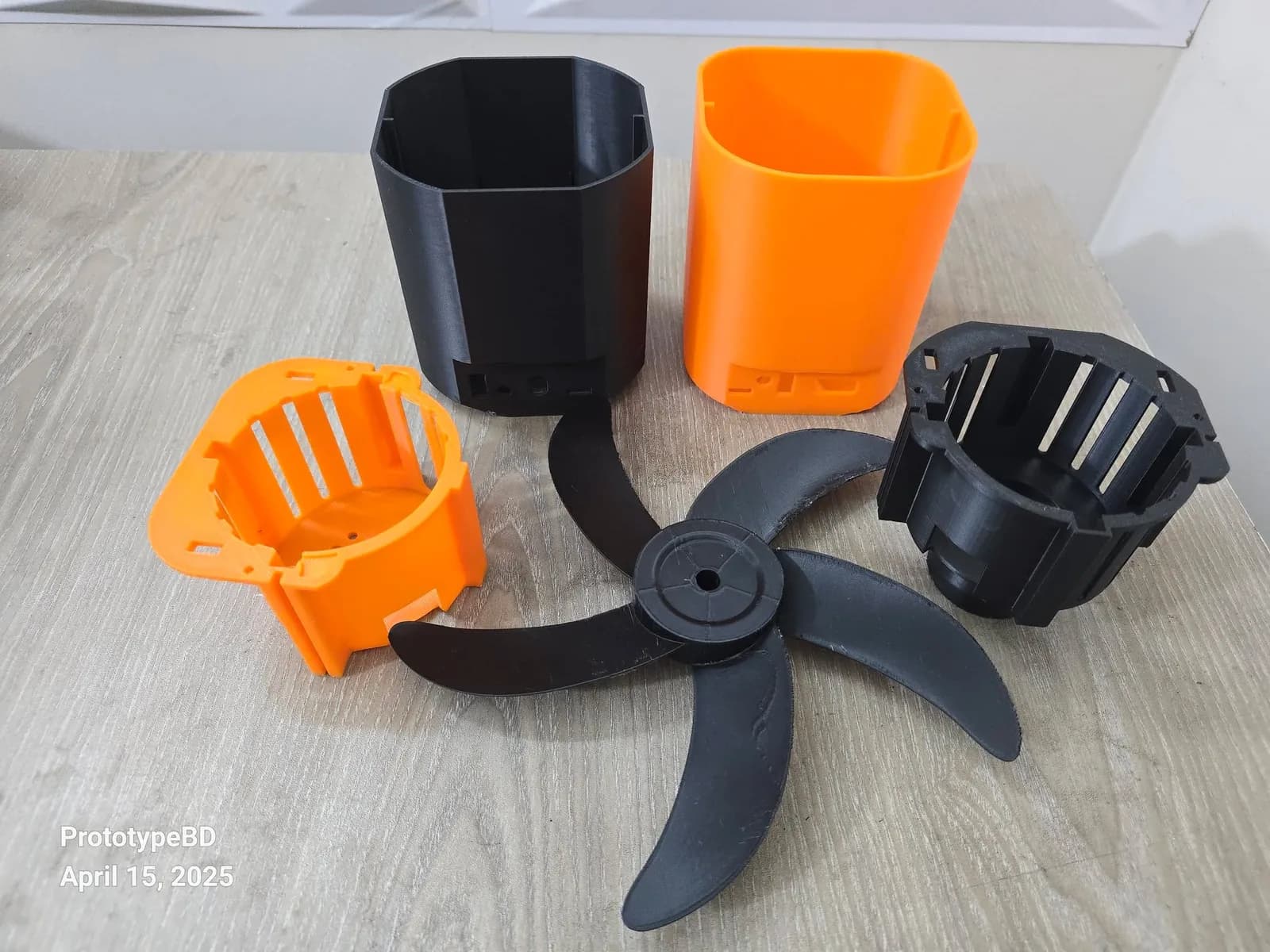
Product prototyping with 3D printing: real examples from Bangladesh
Why to prototype before tooling, what form, fit and function prototypes test, and how tight printed fits can be, with eight projects from our Dhaka workshop.
3D Printed Robot Parts in Bangladesh: Six Robotics Projects and a Display Model
What PrototypeBD's robotic arm, rover, self-balancing robot, drone and gear-model prints show about orientation, gears, shafts and filament choice for student robotics.
Architecture Thesis Models in Bangladesh: What 3D Printing Adds
Thesis and jury models PrototypeBD printed from 2023 to 2025: the scales students used, site vs building models, section and split models, and how to prepare your file.
Comments
Loading comments…